Why Business Process Automation Fails Without Proper Process Design
Most workflow automation projects fail because businesses automate broken processes instead of redesigning them first. Here is why process mapping and standardisation must happen before development.

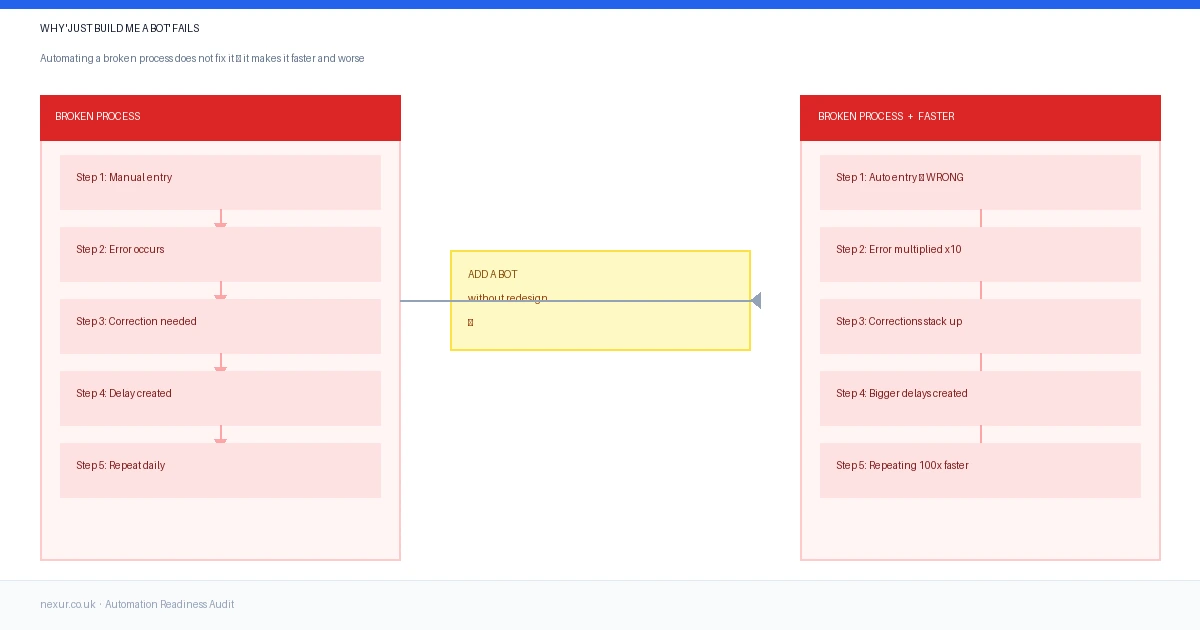
Automation does not fix broken operations. It scales them.
That is one of the most important realities businesses discover too late when starting a workflow automation project. A company identifies a repetitive operational problem. Tasks are slow, inconsistent, and heavily dependent on manual effort. The immediate reaction is often straightforward: “Let’s build a bot to handle it.” On the surface, that sounds logical. Humans are making mistakes, and automation should improve speed and consistency.
However, many automation projects fail not because the technology is poor, but because the underlying process was never designed properly in the first place. When you automate a broken workflow, you do not remove the inefficiencies. You accelerate them. Instead of one employee making a mistake occasionally, the automation system now makes the same mistake hundreds of times at machine speed before anyone notices.
This is why successful business process automation always starts with process design, process mapping, and workflow standardisation before development begins. According to McKinsey, up to 30% of repetitive operational work can already be automated using existing technologies. However, organisations that automate unclear or inconsistent workflows often struggle with implementation failures, operational disruption, and expensive rework.
Why Business Process Automation Projects Fail
The biggest misconception about automation is that it solves operational problems automatically. It does not. Automation amplifies whatever already exists inside the workflow. If the process is efficient, standardised, and clearly documented, automation improves speed, scalability, consistency, and operational capacity. However, if the workflow contains hidden exceptions, inconsistent rules, or unclear ownership, automation magnifies those weaknesses instead. This is one of the most common causes of failed automation initiatives.
A business launches an automation system expecting efficiency gains, and initially everything appears to work correctly. Then real operational complexity begins appearing: missing fields, unusual customer cases, inconsistent approvals, outdated spreadsheets, and exceptions known only by senior staff.
The automation system cannot interpret undocumented business logic the way humans can. As edge cases increase, outputs become unreliable, teams begin manually correcting errors, and eventually the organisation starts running manual processes alongside the automation system just to maintain operational stability. At that point, the company is paying for both systems while receiving the benefits of neither.
The Real Problem: Automating Undefined Workflows
Most broken processes share similar characteristics.
The Process Depends on Tribal Knowledge
If only one employee truly understands how the workflow works, the process is not operationally stable. Automation systems require documented logic, and human memory is not documentation.
Exceptions Are Handled Inconsistently
Many businesses rely on experience-based decision-making instead of standardised rules. One employee approves a request, another rejects it, and a third escalates it. The workflow becomes unpredictable, making reliable automation nearly impossible.
Outputs Vary Depending on Who Performs the Work
If two team members following the same workflow produce different outcomes, the process itself is not clearly defined. Automation depends on consistency.
Legacy Steps Remain for No Clear Reason
Over time, businesses accumulate unnecessary approval layers, duplicate data entry, and outdated checks. These steps often survive simply because nobody revisited the process structure itself.
Teams Are Manually Copying Data Between Systems
This is often a systems integration problem disguised as an operational workflow. Automating repetitive copy-paste work may reduce effort temporarily, but it does not solve the underlying architecture issue.

Why Process Mapping Must Happen Before Development
One of the most overlooked parts of workflow automation is process mapping. Businesses frequently jump directly into development conversations such as which AI tool to use, whether the automation can connect to their CRM, or how quickly deployment can happen. However, none of those questions matter until the workflow itself is fully understood. Process mapping means documenting every operational step, decision point, ownership structure, input and output, exception scenario, fallback process, and approval rule.
This creates clarity before automation begins. Without process mapping, development teams are forced to make assumptions about how the workflow should behave. Those assumptions almost always create instability later.
Automation systems are only as reliable as the workflows behind them.
If the process is unclear, inconsistent, or undocumented, the automation becomes fragile by default.
How to Redesign a Workflow Before Automating It
Effective process redesign does not need to be overly complicated. It simply needs to be structured and honest.
Step 1: Map the Workflow Exactly as It Operates Today
Do not document the ideal version. Document reality. That includes workarounds, manual overrides, informal approvals, edge cases, and missing data scenarios. The goal is operational accuracy, not organisational optimism.
Step 2: Challenge Every Step
Ask a simple question:
Does this step actually need to exist?
Many operational workflows contain layers added years ago for problems that no longer exist. Eliminating unnecessary steps before automation reduces complexity dramatically.
Step 3: Fix Workflow Inconsistencies
Before any automation build starts, resolve unclear ownership, missing validation rules, inconsistent approval logic, undefined escalation paths, and duplicate systems.
Automation should be built on operational clarity, not operational confusion.
Step 4: Standardise the Redesigned Process
Every workflow should have documented rules, conditions, exceptions, and expected outputs. If the process cannot be explained clearly in writing, it is not ready for automation.
Step 5: Only Then Begin Development
At this stage, automation becomes significantly easier because requirements are clearer, testing becomes more predictable, integrations are cleaner, and long-term maintenance becomes simpler. The automation succeeds because the operational foundation is stable.
A Real Example of Failed Workflow Automation
A logistics business attempted to automate invoice approvals before standardising supplier submission formats. Initially, the automation appeared successful. However, within two weeks, invoices failed validation checks, duplicate approvals increased, inconsistent file formats broke processing rules, and finance teams reverted to manual verification.
The automation itself was not technically broken. The underlying operational workflow was. After redesigning supplier submission requirements and standardising approval logic, the automation system was rebuilt successfully with significantly fewer errors. This is a common pattern across workflow automation projects.
Technology rarely fails first. Process design usually does.
The Cost of Skipping Process Design
The cost of failed automation projects extends far beyond development spend.The direct financial impact often includes redevelopment costs, operational disruption, consultant time, testing delays, emergency fixes, and parallel manual operations. For mid-sized automation projects, failed implementations can easily cost between £15,000 and £30,000 before considering lost productivity.
However, the operational costs are often worse. Teams lose confidence in automation initiatives, internal resistance increases, and future digital transformation projects become harder to implement. Poor automation experiences damage organisational trust.
All of this usually traces back to one issue:
The business automated before redesigning the workflow properly.

Questions to Ask Before Starting Any Automation Build
Before beginning any workflow automation project, ask two critical questions.
Have We Mapped the Workflow Completely?
That includes exceptions, edge cases, fallback scenarios, approval logic, and ownership structures. If not, process mapping should happen first.
Are We Automating the Workflow as It Exists Today, or as It Should Operate?
If the answer is “as it exists today,” the workflow likely still requires redesign work.
Strong automation partners will push back on unclear processes before development begins. That is not resistance. That is good delivery practice.
Why an Automation Readiness Audit Matters
An automation readiness audit helps businesses identify which workflows are truly ready for automation and which still require operational redesign. This prevents businesses from investing in fragile automation systems built on unstable operational foundations. More importantly, it creates clarity before development budgets are committed.
Final Thoughts
Workflow automation can create enormous operational value when implemented correctly. However, automation is not a shortcut around poor operational design. It is a multiplier. Well-designed workflows become faster, more scalable, and more efficient. Broken workflows become harder to manage at machine speed. That is why process design must always happen before development.
Ready to Assess Your Automation Readiness?
Before building automation systems, make sure the workflow itself is ready.
Apply for the free automation audit →